Notice: Function _load_textdomain_just_in_time was called incorrectly. Translation loading for the miniorange-login-openid domain was triggered too early. This is usually an indicator for some code in the plugin or theme running too early. Translations should be loaded at the init action or later. Please see Debugging in WordPress for more information. (This message was added in version 6.7.0.) in /home/vazar/litespeed.vazar.jp/www/wp-includes/functions.php on line 6131

Notice: Function _load_textdomain_just_in_time was called incorrectly. Translation loading for the wc-multivendor-marketplace domain was triggered too early. This is usually an indicator for some code in the plugin or theme running too early. Translations should be loaded at the init action or later. Please see Debugging in WordPress for more information. (This message was added in version 6.7.0.) in /home/vazar/litespeed.vazar.jp/www/wp-includes/functions.php on line 6131

Notice: Function _load_textdomain_just_in_time was called incorrectly. Translation loading for the woocommerce domain was triggered too early. This is usually an indicator for some code in the plugin or theme running too early. Translations should be loaded at the init action or later. Please see Debugging in WordPress for more information. (This message was added in version 6.7.0.) in /home/vazar/litespeed.vazar.jp/www/wp-includes/functions.php on line 6131

Notice: Function _load_textdomain_just_in_time was called incorrectly. Translation loading for the wc-frontend-manager domain was triggered too early. This is usually an indicator for some code in the plugin or theme running too early. Translations should be loaded at the init action or later. Please see Debugging in WordPress for more information. (This message was added in version 6.7.0.) in /home/vazar/litespeed.vazar.jp/www/wp-includes/functions.php on line 6131

Notice: Function _load_textdomain_just_in_time was called incorrectly. Translation loading for the woocommerce-subscriptions domain was triggered too early. This is usually an indicator for some code in the plugin or theme running too early. Translations should be loaded at the init action or later. Please see Debugging in WordPress for more information. (This message was added in version 6.7.0.) in /home/vazar/litespeed.vazar.jp/www/wp-includes/functions.php on line 6131

Notice: Function _load_textdomain_just_in_time was called incorrectly. Translation loading for the sw_woocommerce domain was triggered too early. This is usually an indicator for some code in the plugin or theme running too early. Translations should be loaded at the init action or later. Please see Debugging in WordPress for more information. (This message was added in version 6.7.0.) in /home/vazar/litespeed.vazar.jp/www/wp-includes/functions.php on line 6131

Notice: Function _load_textdomain_just_in_time was called incorrectly. Translation loading for the woocommerce-for-japan domain was triggered too early. This is usually an indicator for some code in the plugin or theme running too early. Translations should be loaded at the init action or later. Please see Debugging in WordPress for more information. (This message was added in version 6.7.0.) in /home/vazar/litespeed.vazar.jp/www/wp-includes/functions.php on line 6131

Notice: 関数 _load_textdomain_just_in_time が誤って呼び出されました。emarket ドメインの翻訳の読み込みが早すぎました。これは通常、プラグインまたはテーマの一部のコードが早すぎるタイミングで実行されていることを示しています。翻訳は init アクション以降で読み込む必要があります。 詳しくは WordPress のデバッグをご覧ください。 (このメッセージはバージョン 6.7.0 で追加されました) in /home/vazar/litespeed.vazar.jp/www/wp-includes/functions.php on line 6131
商品をギフトする/受け取る方法 - VazaR

商品をギフトする/受け取る方法

「ギフト」は購入した商品の権利を他人に譲渡する機能です。

・「ギフト」として購入した商品を自分で使用することは出来ません。
 ※ギフトとして購入した商品を自分が受け取ることは可能です。
・受け取り完了した「ギフト」は返金したり権利を戻すことは出来ません。

・VazaRとVazaR Rocketでギフト機能が異なりますのでそれぞれをご確認ください。

・「ギフト」の有効期限は基本的に90日間です。

ギフトを送る方法(VazaR)


ギフト購入

  1. 贈りたい商品の商品ページにアクセス
  2. 「この商品をギフトとして送る」 にチェックを入れる
  3. 「ギフトとしてカートに追加」を押す
  4. 購入手続きへ進む

購入手続き

  1. 通常通り購入手続きを進める
  2. 「ギフト:〇」となっていることを確認する
  3. 支払い方法を選択
  4. 「注文する」 をクリック

ギフト送信の確認

1.注文完了後、ギフト用URLが発行されます
2.このギフト用URLをギフトしたい人へ送ってください
3.注文完了ページ以外にも「MY ACCOUNT」→「ギフト管理」→「送信したギフト」からギフト用URLを取得できます

ギフトの受け取り方

  1. VazaRにログインします(未登録の場合は登録を行ってください)
  2. ギフト用URLへアクセス
  3. 「ギフトを受け取る」 ボタンをクリック
  4. ギフトがアカウントに追加されます

ギフトを送る方法(VazaR Rocket)


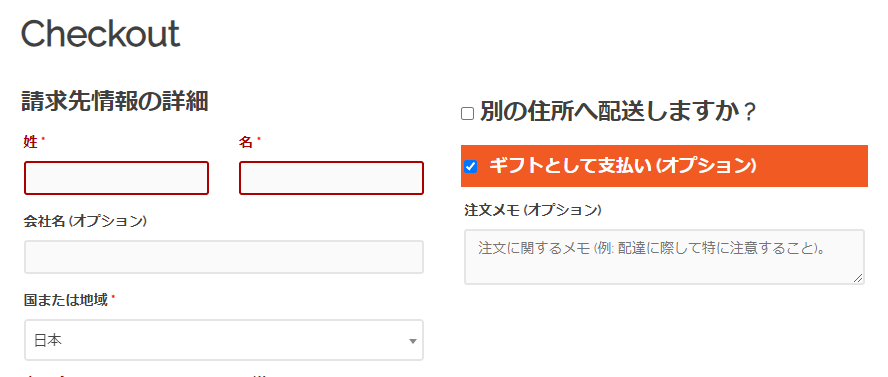
1.商品を購入時に「ギフトとして支払い」にチェックを入れて購入する
  ※購入されるすべてのアイテムが「ギフト」になるのでご注意下さい
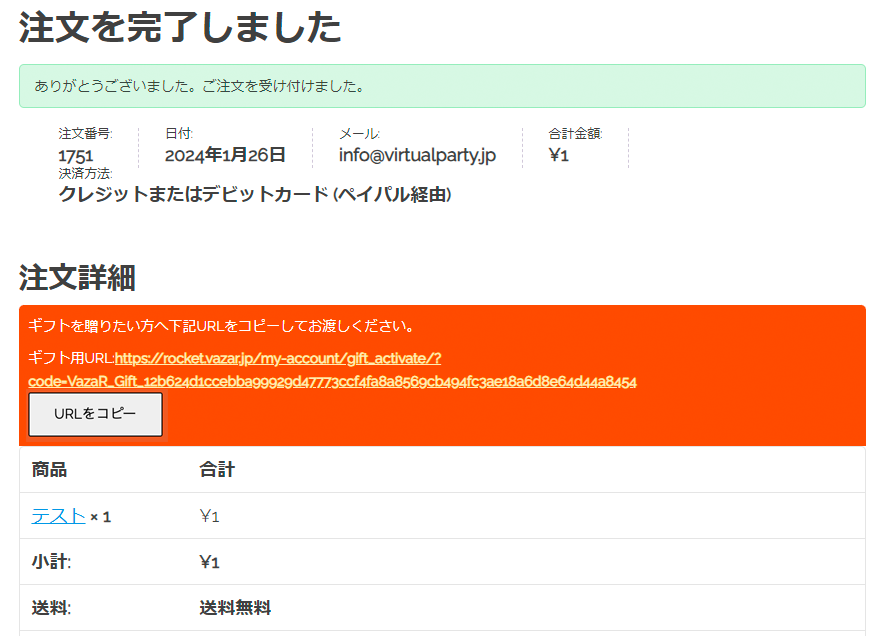
2.注文完了時のギフト用の「URLをコピー」して、プレゼントしたい人に送る
商品ギフトを受け取る方法

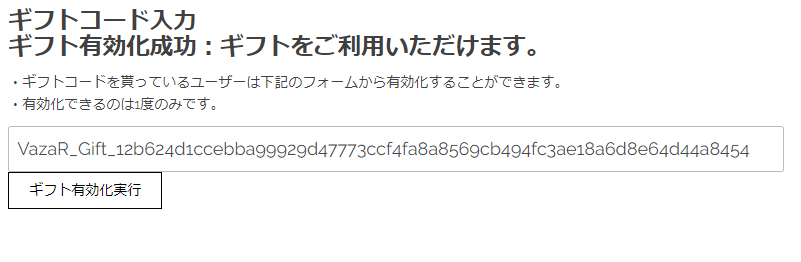
1.ギフト用URLをクリックして、「ギフト有効化実行」を行う
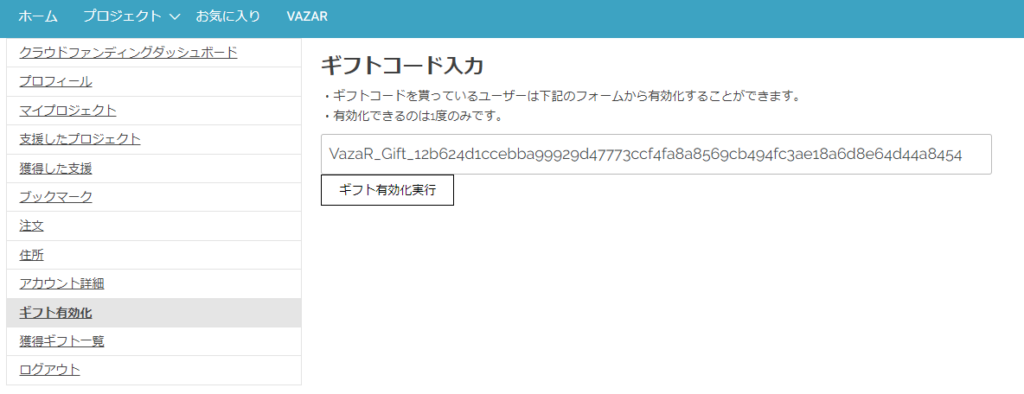
2.「ギフト有効化成功」になったら受け取り完了です
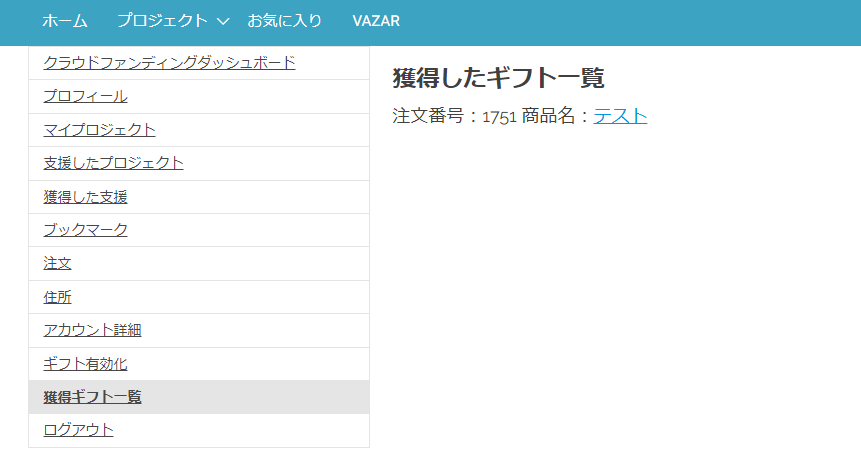
3.「獲得ギフト一覧」から有効化したギフトの一覧を確認できます
Related News

x